My CCR is attached below
Thursday, December 16, 2021

Monday, December 13, 2021
Music Video Blog
Disproving my original perception, creating a music video was very different compared to the commercial. Filming outside of school made choosing filming dates significantly harder, organizing the scenes much more complicated, and most importantly, set the expectations higher. A wider range of options meant that my partner and I needed to go above and beyond the expectations we set for ourselves in the previous project to ensure our music video is up to standard with the rest. Although there were a lot of similarities. The most notable of which was that even if the work was more this time, I still had to put a lot of effort into perfecting my music video. Although, I once again had a lot of fun filming, planning, and editing this project. And just as last time, my partner and I worked extremely well together with delegating the tasks evenly to play to each of our strengths. 2 projects in and I'm still loving this class. And my eyes are now set on my next big project coming up after we get back from winter break. All in all, Music Time was definitely a successful operation.
Saturday, December 11, 2021
Wrapping it Up
So now with all of the clips shortened and at the exact length we need them to be at, we only had a few more steps. The first one was to add all the transitions between each shot. Especially for the memory scenes since the backgrounds were the same we needed to ensure that the fade transitions lined up. After adding all of those and messing around with the speed of this transition we had this part finished up. The next part of the editing was adding the music. We tried different starting and stopping points throughout the song. Originally we liked it starting right at the first chorus, but I was also a fan of starting at the second verse of the song. But eventually, we resorted back to starting the music right at the beginning of the song. This ended up working best since it ended right as the instrumental part of the song ended so it seemed to wrap it up nicely. The last few steps were just small changes to make it perfect. The first of these was adding a fade to black at the end of the video. We figured this lined up nicely because it added to the mystery of who was the new girl answering the door in the final shot of the music video. After that, we experimented with adding a song title in the first shot. We tried putting it in the first shot, having a title card and evening putting it at the end. But after many fonts tried and colors used, my partner and I came to the conclusion that putting the song title didn't fit in at any point so we abandoned the idea. With the video seemingly finished we sent it to a couple of our friends to get it peer-reviewed. And of all the friends we sent it to, all of them said they liked it and didn't have any suggestions on how to fix it. So with that all done we exported the final draft onto our computer. This took almost an hour both because of the slow internet and then we exported it at the maximum quality we could. But 2 months after starting, we finally finished our music video that I was very proud of.

Thursday, December 9, 2021
Preforming Surgery On My Video
Although my partner and I had done almost all of our shots in less than three takes, the editing process wasn't any quicker than the last project. Our first step was to go through every take and find which ones we liked the best. We looked at lighting, movements of the camera, and even the facial expressions of the actors. On occasions, we would have two takes that we both thought were equally good and we would flip a coin or something else along those parameters to decide which take to use. After we found each take we wanted we needed to trim each takes to exactly when it should start and end. My partner and I split this 50/50. She trimmed the first half of the scenes while I trimmed the second half. For my shots I had them start right as the actor enters the frame. And they would end immediately after the actor's movements stopped. For the most part, this step was easy. But we ran into some problems along the way with this that I'll get back to in a second. We then decided to put the trimmed shots in order in iMovie to see what a cohesive rough draft of the video would look like. We had to reference the storyboard a lot here to see what went in what order. But eventually, we figured it out. Here's where the problem came. We were way over the 1:15 time we were aiming for. So we had two choices from here. We either trimmed each shot even more or we removed shots and scenes we didn't think were necessary. Eventually, we did a combination of both trimming and deleting. And by the end of this, we got down to that 75-second spot we needed to be at.

Wednesday, December 8, 2021
Finishing Filming After a Long Day
After a lunch break, my partner and I got right back to filming. The next scene on our agenda was the kitchen scene. Just as I talked about in the last blog, we followed 3 steps for each scene. Find my starting and ending mark, place the camera, and then find the actor's mark for the next shot. And for this scene, it was no different. For the first shot of the scene, I walked into the kitchen from the room next to it and then look over at the oven. And in the memory shot that went with this scene, I had to place cookies into the oven with the other actor sitting on the counter right next to me. I once again had to change my costume to match the last memory scene but this time I wore oven mitts to fit the scene. We did more or less the same steps for the next scene in the bedroom. The only difference was that Bliss followed me with the camera on the tripod and had to place it down before the end of the shot so that the proceeding shot had a seamless fade-in transition. But we changed it up once we got to the next scene. I as the actor had to show a visual change in my attitude from sad to determined in this shot. So I lifted up my head, shook it, and walked out aggressively. The next couple shots showed me leaving my house and getting in my car and driving off. Once in my car, we went back to the formula of filming the present-day shot followed by a memory scene. But this time instead of fading from a shot of just me to a shot of both actors, it went from a shot of the rose to a shot of just my partner. We then filmed a shot of my car pulling into a driveway which tracked the car until it was parked which then tracked me as I got out and walked to the front door. I had to do one more shot of me walking up to the door which was a medium-wide shot. And for the last scene, we had a close-up of my hand knocking on the door and then I filmed a shot of my partner's hand opening it. At long last, we were finally finished with filming.
Tuesday, December 7, 2021
Faking Tears for an A
During the first part of our first film session, my partner and I had one goal in mind. This was to find the best way to do the transition between present scenes and the memory scenes in the music video. Our original plan was to film two scenes from the same spot and with the same angle and layer the videos on top of each other so I as the actor could appear twice in the same shot. But we ran into some limitations with this. The first and more obvious one was that since we didn't have thousand-dollar camera equipment we couldn't film any pans, tracking shots, or follow shots. This is because we wouldn't be able to move the camera at the exact same speed and exact same angle to line them up perfectly in post-production. The second limitation of this was that we weren't exactly sure how to layer the shots seamlessly onto one another. We tried several editing platforms but we realized quickly that we would need to spend a significant amount of money on an editing platform that could do this. So the backup plan for this was to just film two shots with a tripod so that the camera didn't move and fade the shots into each other in post-production. This still had the first limitation of not being able to move the camera but we could do this for free. The next thing we did was decorate the settings we filmed in with Christmas decorations. We put a reef on my door, nutcrackers by the door, and Christmas towels next to the oven. Once this was done we started to film each scene in chronological order of our video which means our first shot was the one of me entering my house and looking over to my couch. We decided to film one scene and then take a lunch break and plan the rest of the scenes after. The formula for each shot was pretty similar. We started off by figuring out where the actor is going to start and stop in each scene. Then based on what shot and angle we wanted to use we would place the camera in a place where it can pan to capture the actor in the scene. After that, we would figure out where the two actors in the memory scene needed to be to fit into the frame. Now for the actual filming, we used a medium shot that originally has the door at center frame but once I walk into the frame the camera pans to track me while I keep my head down to appear sad. And after we filmed this scene we couldn't touch the camera and I changed my costume into a different hoodie and my co-actor and I sat on the couch for the following scene.

Saturday, November 20, 2021
Storyboard

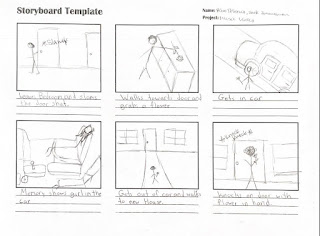

Box 1: The first shot of the music video will be a medium shot of the main actor walking into their house with tears in their eyes as they just got their heart broken. The house is decorated with Christmas decorations to establish the time of the year the video takes place in. The actor is wearing cold weather clothes as well to further establish that the video takes place around Christmas.
Box 2: Once in the house with a close up shot the main actor looks over to the side which transitions into an over the shoulder shot of him looking at the couch that he once was on with his ex. Now with a POV shot, the main actor is watching a memory of him and his ex girlfriend on the couch when they were happy together.
Box 3: This following scene takes place in the kitchen. With another medium shot the actor enters the scene and as the camera pans from being in front of him to his left side, the actor looks over at the kitchen island to his right.
Box 4: In this memory shot, a wide shot shows the two actors are making gingerbread cookies together on the kitchen island with each other. The female actor is sitting on the island while the male actor is putting the cookies in the oven. Both of them are wearing an apron over their outfits.
Box 5: The next scene will be filmed as an over the shoulder shot following the main actor as he opens his bedroom door, walks in and before doing anything looks straight at his bed and once again watches his memories with him and his ex girlfriend. If we also have time we will include a minor shot of the actor walking up the stairs before this scene.
Box 6: This two shot shows the two actors laying together on the bed. They are both looking over at their computer which is playing a Christmas movie on it. Both of the actors will be wearing Christmas sweaters in this shot.
Box 7: Now with a new look on their face, the main actor storms out of the bedroom and slams the door. The camera stays in the same place but tracks them as they walk to the stairs and starts walking down them in a hurry.
Box 8: The main actor now walks towards the front door. with a medium long shot you can see them grab a flower from a vase and exits the house. Just like the last shot they appear to be in a hurry wherever they are going.
Box 9: Filmed from the outside the drivers side of the car, the actor opens the door, places the flower on the passenger seat and turns on their car. The next shot will be inside the car and will be a close up of their hand putting the car in reverse.
Box 10: The next scene will be filmed from the inside of the car as they are driving and will initially show the flower on the passenger scene but will then have a jump cut into the same shot but a memory of the female actor sitting in the passenger seat.
Box 11: Now at their destination, the actor gets out of their car and in a wide shot walks up the door of a new house with the flower in hand.
Box 12: Filmed with a close up of the actors hand, they knock on the door. We will add the knocking sound to this scene during the editing process to make sure its not loud enough to interrupt the music but still able to be heard by the audience.
Box 13: In the last shot filmed from behind the main actor we see them take one last deep breath and the door starts to crack open. Before you can see who it is though the video fades to black and ends at the lines, "ill give it to someone special"
Subscribe to:
Posts (Atom)

-
How many titles are displayed during the opening sequences to the film? Which Ones? There are a total of thirty-three titles listed in t...
-
CAMS Over the shoulder Two shots Close ups Extreme long/Establishing shots Medium shots Point of view Single Panning Eye level ...
-
artofthetitle.com While looking for resources to research title sequences, we stumbled upon the website. We were worried we'd have tro...


